AI customer service with an inbox and assistant
An assistant answers from your own knowledge. You read the conversations and take over where needed.
- Sign up and hear among the first when there is room
- The demo is simply open
- Business only, all prices excl. VAT

What is AI customer service with an inbox?
An assistant on your site answers questions from your knowledge and says it is an AI. In the inbox you read the conversations, resolve unanswered questions and take over live. A ceiling per day and per month keeps the costs under control.
- What it does in short
- An assistant on your site that answers questions from your own knowledge, and an inbox where you read the conversations, resolve unanswered questions and take over live.
- What it does not do
- No promise about how many questions the assistant resolves itself. Resolved is meant strictly: a thumbs up, or a conversation with one question, without an unanswered question and without an email.
- Who is this for?
- Companies that want to manage customer questions from their site and WhatsApp in one place.
- Price
- From €29 per month, excl. VAT
How the assistant learns from your knowledge
He answers only from your own sources. What he does not know ends up with you, and you decide what he learns from it.
- Your own questionsTake priority over everything on your site.First
- Your FAQ pageRead from your own site.
- Your sitemapThe pages of your site.
A question without an answer appears under the unanswered questions. One click turns it into your own question. Nothing goes live by itself.

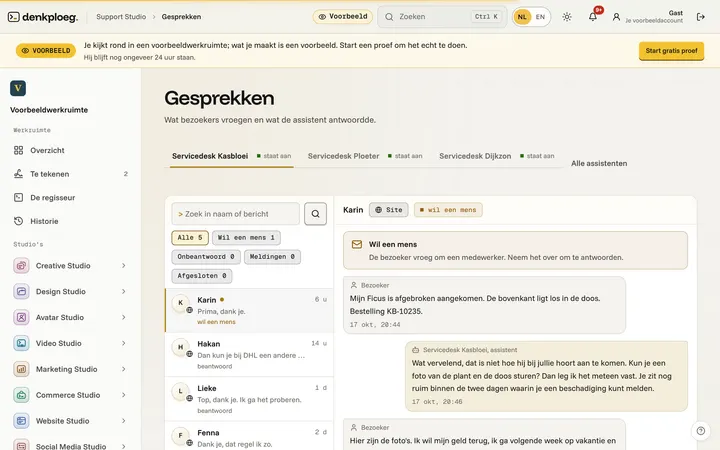
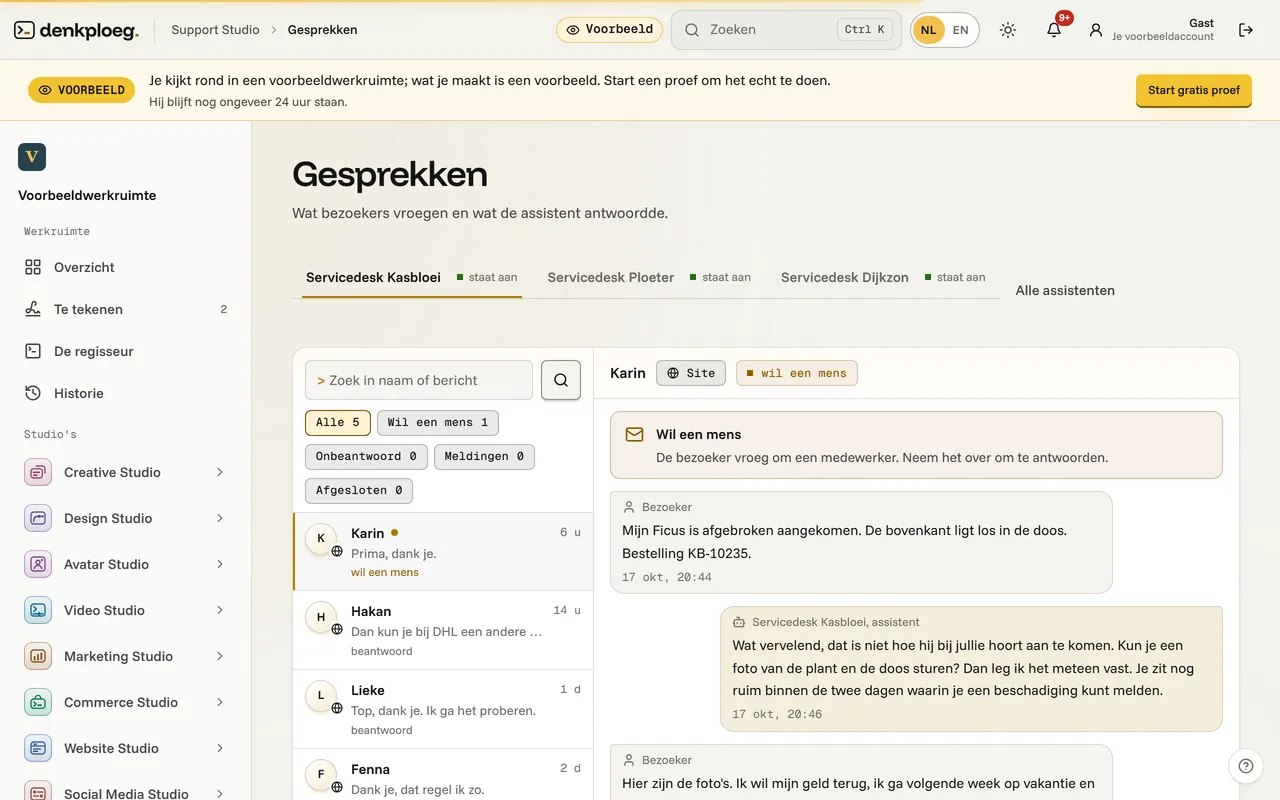
The Support screen in the portal with three conversations: one answered from the knowledge base, one unanswered and one that Sanne took over.
The real Conversations screen
This is what the inbox looks like in the example workspace, with the service desk of the demo nursery Kasbloei.
How to set it up, in three steps
Paste one line into your site, set the limits and then approve every answer he learns yourself.
Create an assistant and feed it
Give it a name, point it at your site and add your own questions.
Set the ceiling and handover
Choose tone, looks and a ceiling per day and per month, and an email address for questions it does not know.
Read the inbox and improve
You read conversations, improve an answer and accept the suggestions for your own questions.
Simplified examples with the demo nursery Kasbloei.
What you get
A place where you see what customers asked and what was answered, with the assistant as the first line and a person as the safety net.
A customer card for Corrie Bakker on which the follow-up Call back in 3 months appears and gets ticked off.
Three proposals are ready with Waiting for you: a quote, a route and a message. You sign, and the chip becomes Signed.
Simplified examples with the demo nursery Kasbloei. The dashboard with the costs of the last thirty days is in the app.
The assistant behind it stays within its limits
Three limits that you control yourself.
Only from your sources
Your sitemap, an FAQ page and your own questions.
It says it is an AI
A visitor always sees that they are talking to a virtual assistant.
A ceiling in euros
You set a ceiling per day and per month.
What does it cost?
The price per month, excluding VAT. You can switch package.

Support
An assistant on your site that answers questions.
- 300 credits per month
- 5 users included
- 300 conversations per month included
- Nothing goes out without your signature

Assistant with cookie banner
An assistant that answers your visitors' questions, and a cookie banner that asks for and records consent. For your existing site.
- 300 credits per month
- 5 users included
- 300 conversations per month included
- Nothing goes out without your signature

Website with customer service
Website plus an assistant that answers your visitors' questions.
- 800 credits per month
- 3 users included
- 600 conversations per month included
- Nothing goes out without your signature
Inbox and assistant next to Tidio, Chatbase and Intercom
What the providers' own pages say, side by side. We compare each provider's entry plan.
| Reference | DenkploegSupport | TidioStarter | ChatbaseHobby | IntercomFin |
|---|---|---|---|---|
| Price per month | €29 per month, excl. VAT | $ 24.17 per month, 100 conversations; the AI add-on starts at $ 32.50 for 50 conversations | $ 32 per month on annual billing, 700 message credits | $ 0.99 per outcome, plus a seat from $ 29 per month (Essential) |
| Look back at conversations in an inbox | YesConversations, unanswered questions and reports | Open (not established) | PartlyHelpdesk inbox in Standard and Pro | Open (not established) |
| A person takes over the conversation | YesLive in the chat, or the question by email | PartlyAs a feature of the AI agent | PartlyNot in Hobby, yes in Standard and Pro | Open (not established) |
| Answers from your own sources | YesSitemap, FAQ and own questions, up to 300 public pages | Open (not established) | YesFrom your documents | Open (not established) |
| Says it is an AI | YesCannot be switched off | Open (not established) | Open (not established) | Open (not established) |
| Ceiling per day and month in euros | Yes | Open (not established) | NoCredits per month | Open (not established) |
| PartlyThrough a linked business number | Yes | Yes | Open (not established) | |
| A conversation belongs to a customer | YesPoints to the same relation in Relations | Open (not established) | Open (not established) | Open (not established) |
| Why Denkploeg | Support is the assistant on your site and the inbox behind it in one package: the assistant answers from your sources and says it is an AI, and a colleague takes over the conversation or gets the question by email. | |||
Source and reference date: Denkploeg (app.denkploeg.nl/ai-klantenservice); Tidio (www.tidio.com/pricing/); Chatbase (www.chatbase.co/pricing); Intercom (www.intercom.com/pricing) ().
Amounts are in the currency of the source and are not converted. Open means we could not establish it on that page, not that it is missing. Whether VAT is in an amount, we only say when the source says so. Is something wrong, or out of date? Let us know.
Good to know
The questions every business owner asks before he leaves customer questions to an assistant.
What is a customer service inbox?
A place where you read and answer customer questions. It holds the conversations of the assistant on your site, the questions it did not know and the conversations a colleague takes over.
How do I take over a conversation?
With live chat you take over a running conversation and hand it back to the assistant. If it does not know, a colleague gets the question by email.
How long do you keep conversations?
As long as you set: 90 days by default, 730 at most. After that they disappear by themselves. For an access or erasure request you export or erase all conversations of a visitor.
Can the assistant make things up?
It answers from your sitemap, your FAQ and your own questions. If it does not know, the question comes back to you and you can turn it into your own question.
What does a customer service inbox cost?
Support has its own package. The price is under 'What the customer service inbox costs' on this page, from our price list.
How do you automate customer service?
Put an assistant on your site that answers questions from your own knowledge, and read the conversations back in an inbox. What the assistant does not know reaches you as a question, and you take over live whenever needed.
Honest about what the inbox does not do
What we do not do:
- No promise about how many questions the assistant resolves itself. Resolved is meant strictly: a thumbs up, or a conversation with one question, without an unanswered question and without an email.
- WhatsApp works through a linked business number; a separate inbox for WhatsApp is a separate option.
- Looking up orders only works with a linked Shopify store, and only with email address and order number together.
Start with one question
No card. You set a ceiling yourself.